Engineering workflow management: Examples, software & templates
Software engineering teams move fast—but only when everyone is moving in the same direction. As products grow more complex and teams become more distributed, the way work flows from idea to impact matters just as much as the work itself.
A well-designed engineering workflow gives you a shared path from idea to delivery to learning, where documentation, tasks, and decisions stay connected as work evolves. When context moves as smoothly as code, you’ll spend less time catching up and more time shipping.
Key takeaways
An engineering workflow is a shared, repeatable system that guides the development process from idea to delivery—covering how teams think, collaborate, and move work through the pipeline.
Common workflow types include DevOps, code management, data engineering, and product management workflows, each solving a distinct set of problems.
Strong workflows make work visible, preserve context, and create consistency without rigidity.
The right software should bring docs, tasks, roadmaps, and decisions together in one place—so teams spend less time switching tools and more time shipping.
What’s an engineering workflow?
An engineering workflow is a shared, repeatable system that guides the development process from idea to delivery, then back into learning. It defines how engineering teams think, collaborate, and move work through the pipeline.
Engineering workflows clarify these things:
Where ideas come from
How teams shape them into requirements
How they make decisions
How they build and review work
How you reflect on what happened after something ships
Strong workflows also do these things:
Make work visible so your team can see what’s happening and why
Preserve context so decisions, trade-offs, and constraints don’t disappear when you close a ticket
Create consistency without rigidity to give your team members a common path forward while leaving room for judgment and adaptability
Common engineering workflow methodologies
People often confuse engineering workflows with project management methodologies, but they're two separate things. Methodologies describe how your team plans and paces work, while workflows describe how work moves through systems. That said, the methodology your team uses will shape the structure of your workflow. Here are the most widely used approaches:
Agile is an iterative approach focused on flexibility and collaboration. Rather than planning an entire project upfront, Agile teams break large initiatives into smaller, manageable phases with continuous feedback loops built in. This allows teams to adapt quickly as requirements change or new information emerges—delivering value incrementally instead of waiting for one large release.
Scrum is a specific Agile framework that organizes work into fixed-length iterations called sprints, typically lasting two to four weeks. Each sprint has a defined goal, a set of committed tasks, and specific ceremonies—including daily stand-ups, sprint reviews, and retrospectives—that keep the team aligned and continuously improving. Scrum assigns clear roles (like a Scrum Master and Product Owner) to ensure accountability at every stage.
Kanban is a visual method for managing workflow that originated from lean manufacturing practices pioneered by Toyota. Rather than working in time-boxed sprints, Kanban focuses on continuous delivery and limits the amount of work in progress (WIP) at any given time. By visualizing the entire process on a board—from backlog to done—teams can quickly spot bottlenecks and resolve them before they slow down delivery.
The pain of broken workflows
Most engineering teams have workflows, but they’re scattered. For instance, sprint plans sit in a project tracker, architecture decisions hide in docs from last year, and incident notes are in Slack threads that no one bookmarked.
Over time, this fragmentation creates these familiar pain points:
Tool sprawl that forces you to jump between systems
Inconsistent rituals where each team does things differently
Information archaeology that slows you down more than it helps
According to a 2025 report by Port, three-quarters of developers lose up to 15 hours each week since they spend their time switching between an average of 7.4 tools daily. That’s almost two full days that they could have spent shipping instead.
Types of engineering workflows
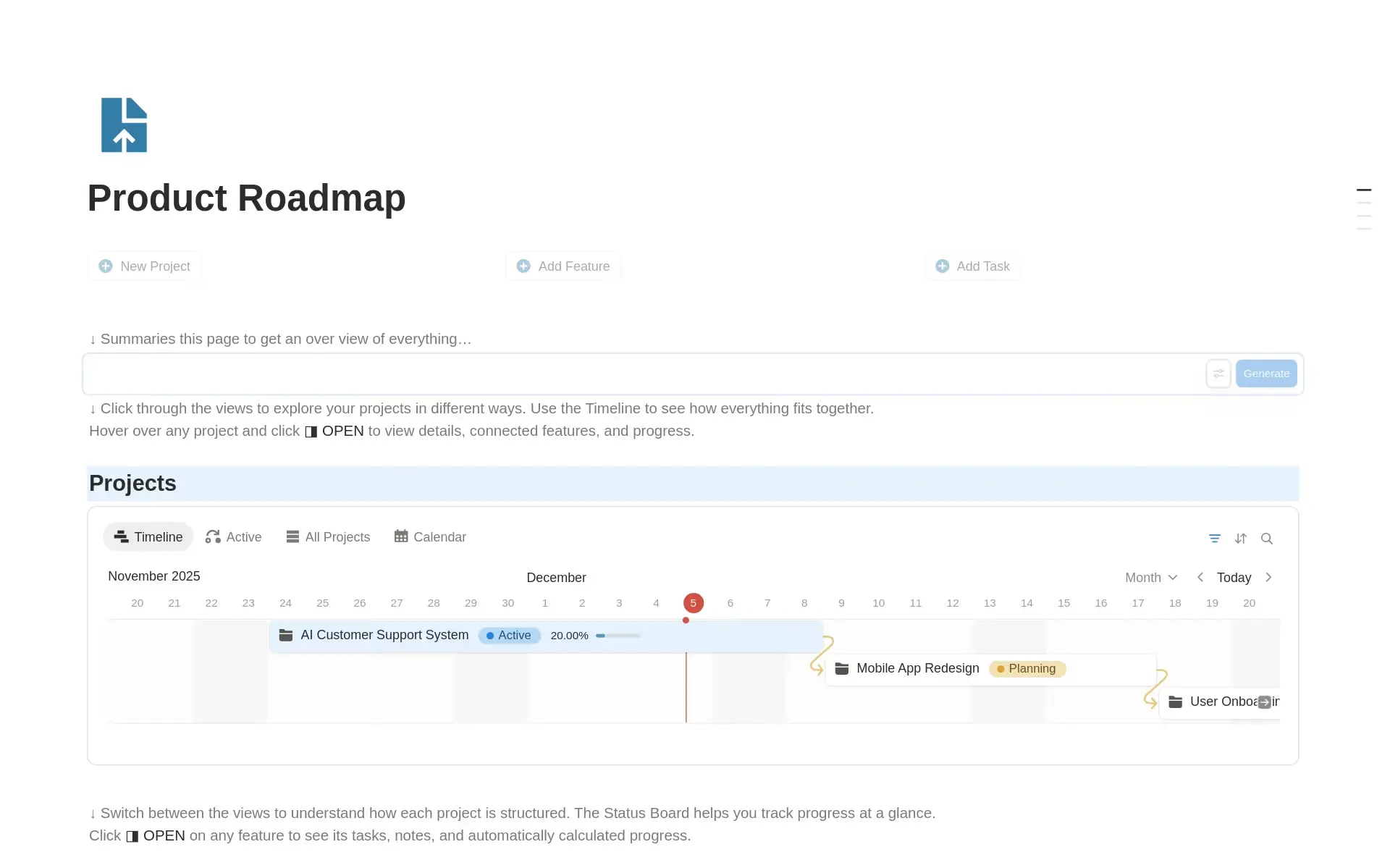
A product management workflow template, available in Notion (Source)
People often confuse engineering workflows with project management methodologies, but they’re two separate things. Methodologies like Agile, Scrum, or Waterfall describe how your team plans and paces work, while workflows describe how work moves through systems.
Here are a few common engineering workflows that teams use:
DevOps workflows: These workflows define how changes get from an engineer’s computer into production—and how teams respond when something goes wrong. They connect building, deploying, monitoring, and fixing software. A good DevOps workflow also makes it easy to see what changed, when it shipped, and how the system is behaving after release.
Code management workflows: Code management covers how engineers work together on code, including how they write, review, test, and merge it. These workflows help development teams avoid confusion, catch bottlenecks early, and make reviews faster and more predictable.
Data engineering workflows: These workflows clarify how raw data turns into something that people can trust and use by tracking where data comes from, how teams transform it, and how changes affect reports, dashboards, or product functionality. This prevents “mystery data” from appearing and makes it easier to understand what numbers mean.
Product management workflows: To connect customer needs to engineering work, these workflows guide prioritization ideas, requirement definitions, and feedback loops. When product management workflows are clear, engineers can understand the why behind what they’re building—and product decisions won’t go missing.
Each workflow solves a different problem, but they often overlap. That’s why, when they’re connected, you’ll spend less time explaining context and more time moving work forward.
What are the benefits of an engineering workflow?
A strong engineering workflow turns individual effort into coordinated progress. That’s because teams with clear workflows tend to do the following:
Move faster because they clarify expectations up front
Ship with confidence by documenting decisions and requirements
Onboard new engineers more easily with visible context
Learn continuously instead of repeating the same mistakes
Most importantly, though, workflows reduce the hidden cost of disconnected knowledge. After all, when documentation, tasks, and decisions live together, teams won’t have to rely on tribal knowledge or dig through Slack threads to understand what’s going on. Additionally, the software you use should be flexible enough to mold to your workflows without slowing you down.
But while having the right workflow in place is key, having the tech to support also matters. According to a study that Notion commissioned, 74 percent of US companies already use project management software, but more than 60 percent are interested in changing tools within the next year.* Clearly, many teams haven’t yet found a system that truly fits how they work.
Basic steps to build an engineering workflow
Before adopting any specific tool, it helps to understand the fundamental steps involved in designing a workflow from the ground up. These steps apply regardless of methodology or platform.
Map your current state. Document how work moves through your team today—where ideas originate, how they become requirements, who reviews them, and where handoffs happen. Be honest about where context gets lost or slows down.
Identify friction points. Look for recurring problems: unclear ownership, duplicated documentation, decisions that live only in someone's head, or handoffs that require too many clarifying conversations. These are the gaps your workflow needs to address.
Define your stages and handoffs. Break your process into clear, named stages—for example, Idea → Spec → In Progress → Review → Done. For each stage, define what "done" looks like and who is responsible for moving work forward.
Document decisions and constraints. A workflow is only as strong as the context it preserves. Establish where architecture decisions, trade-offs, and requirements will be captured so they don't disappear after a meeting ends.
Choose tools that support your workflow. Once your process is defined, select software that fits it—not the other way around. The right tools should reduce friction and support the stages you've already mapped out.
Measure and refine. Track how work flows through your system over time. Look at cycle times, rework rates, and where tasks stall. Use retrospectives to surface improvements and update your workflow accordingly.
What does a strong engineering workflow include?
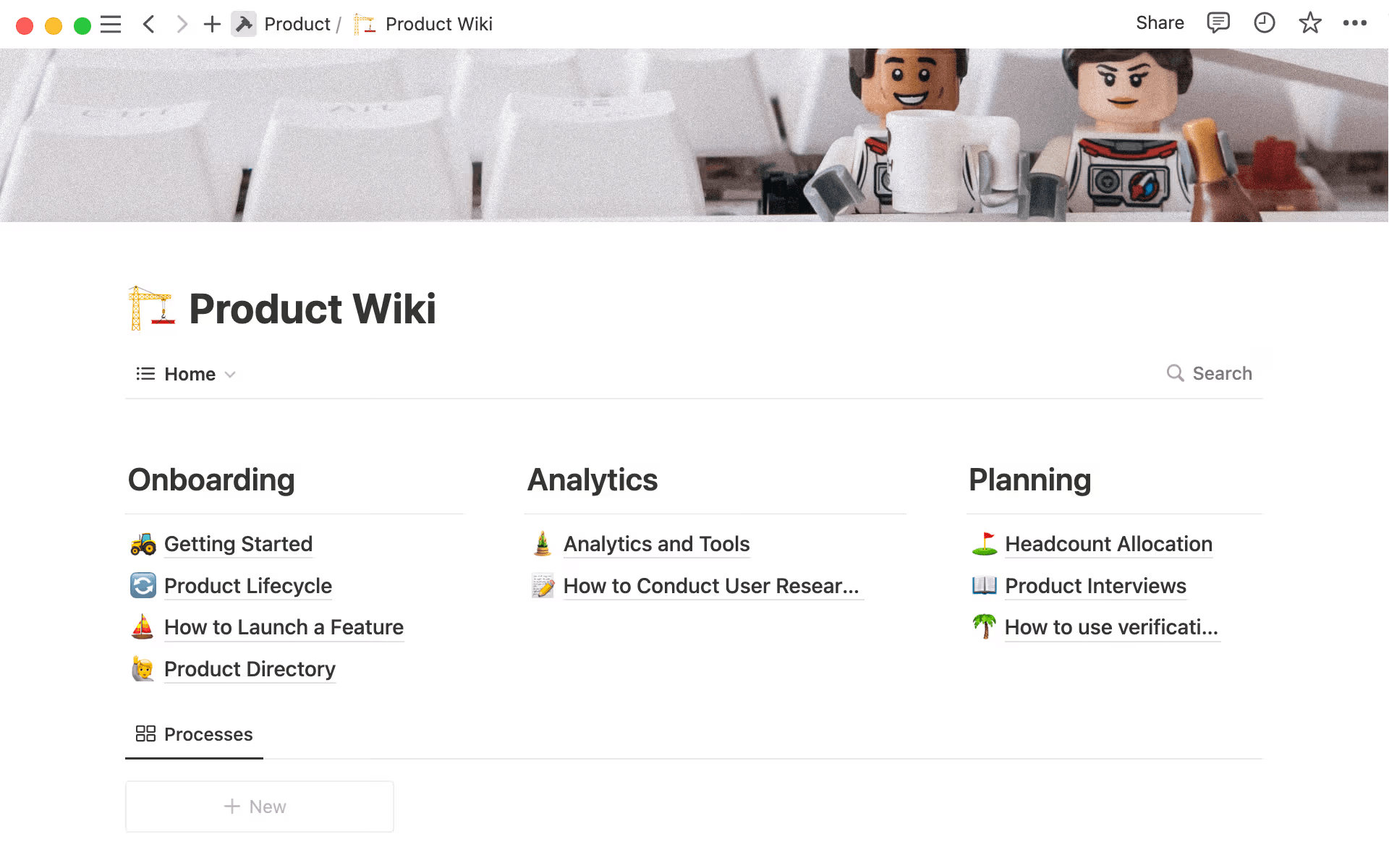
An example of a product Wiki, or central team hub, in Notion (Source)
Teams don’t build effective workflows from a single tool or artifact—instead, they make workflows out of layers that reinforce each other. A connected workspace like Notion makes that reinforcement possible by organizing every piece of your initiative in one place with artifacts that talk to each other so everything stays up to date in real time.
Here’s what strong engineering workflows usually include and how Notion can help:
Docs: Specs, RFCs, runbooks, and retrospectives tell the story of your product. But in Notion, docs aren’t static. Instead, they’re living systems that connect directly to the work they describe.
Repositories: Source code lives elsewhere, but context shouldn’t. That’s why Notion pages can link directly to repos, product requirements, and commits so decisions and implementation stay connected.
Roadmaps: High-level plans help everyone understand priorities and trade-offs. In Notion, roadmaps provide another lens for viewing the same underlying database.
Sprints and backlogs: Tickets don’t exist in isolation. Using Notion, you can link specs, designs, and decisions to move faster and with fewer interruptions.
Decisions: Architecture choices, trade-offs, and constraints need a home, so documenting them once—and linking them everywhere—prevents rework later.
Rituals: Sprint planning, standups, reviews, and retrospectives work best when you capture their inputs and outputs. Notion makes these rituals repeatable without becoming rigid.
When everything stays connected in a single source of truth that everyone can rely on, you can avoid duplicating information and worrying about version control.
How can Notion AI improve your engineering workflow?
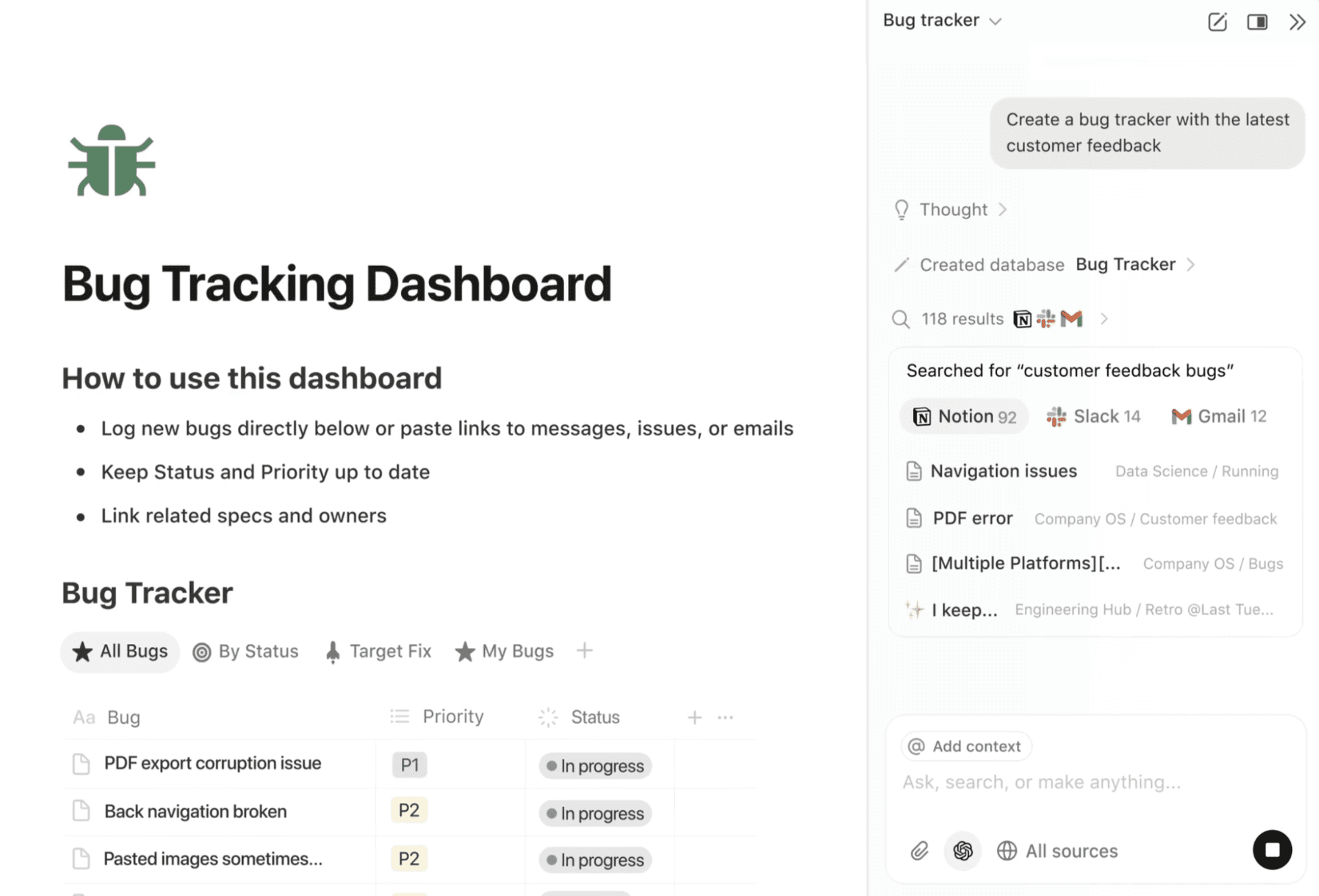
A screenshot of Notion AI creating a bug tracking dashboard based on information from multiple apps (Source)
AI is most powerful when you embed it where work already happens. In fact, according to Bain & Company, some software development companies that integrated AI into their end-to-end workflows have already reported productivity boosts of up to 30 percent.
With Notion AI in particular, instead of bouncing between tools, it can operate across all your docs, tasks, and databases to add leverage without fragmentation. Here are some other ways that you can use it to optimize your engineering workflows:
Generate structure from chaos: Start with a rough idea, meeting notes, or Slack dump and use generative AI to draft a clear spec, task list, or RFC outline in seconds.
Summarize and synthesize: Ask Notion AI to summarize long specs, sprint updates, or incident timelines for reviews, handoffs, or leadership updates.
Fill gaps automatically: Use AI to create tickets from specs, generate acceptance criteria, or draft release notes from completed tasks.
Orchestrate across artifacts: Let AI pull context from related docs, tickets, and decisions so outputs stay grounded in reality, not generic templates.
It’s worth noting, though, that Notion AI doesn’t replace engineering judgment. It instead reduces the overhead around that judgment so teams can focus their energy on more complex tasks.
How to get started with engineering workflows in Notion
Setting up engineering workflows in Notion doesn’t require a large-scale migration on day one. The most successful product development teams instead start small, connect what already exists, and let the workflow mature over time. You can think of the process as building a backbone for your work that supports clarity and speed as your team grows.
Here’s how Notion can support you step-by-step with templates, linked databases, automation, and AI:
1. Map your existing workflow and identify friction points
Before creating anything new, you should take inventory of how your work moves by asking these questions:
Where do ideas come from?
Where do requirements live?
Where does context go missing?
Common friction points include unclear handoffs, duplicated documentation, and decisions that live only in meetings or Slack threads. After you’ve identified them, you’ll want to capture these gaps in a simple doc and use it as your checklist for improvement.
2. Create a connected workspace for docs, tasks, and roadmaps
Instead of having separate tools for specs, tickets, and planning, Notion lets you connect them into one workspace. Most teams start with these components:
A docs space for specs, RFCs, postmortems, and runbooks
A tasks database for backlogs, sprint work, and bugs
A roadmap view that rolls work up by initiative or theme
When you link specs to tasks and tasks feed into the roadmap, updates will flow automatically across your work, which keeps progress accurate and visible without manual effort. To get started quickly, you can use a free software development roadmap template, engineering task template, or another type of engineering template instead of starting from scratch.

Helpful Resource
Take a look at this guide on how to create a connected workspace to learn the basics of working in Notion, including how to create a team Wiki and manage tasks and projects.
3. Use AI to generate structure, draft documents, and fill gaps
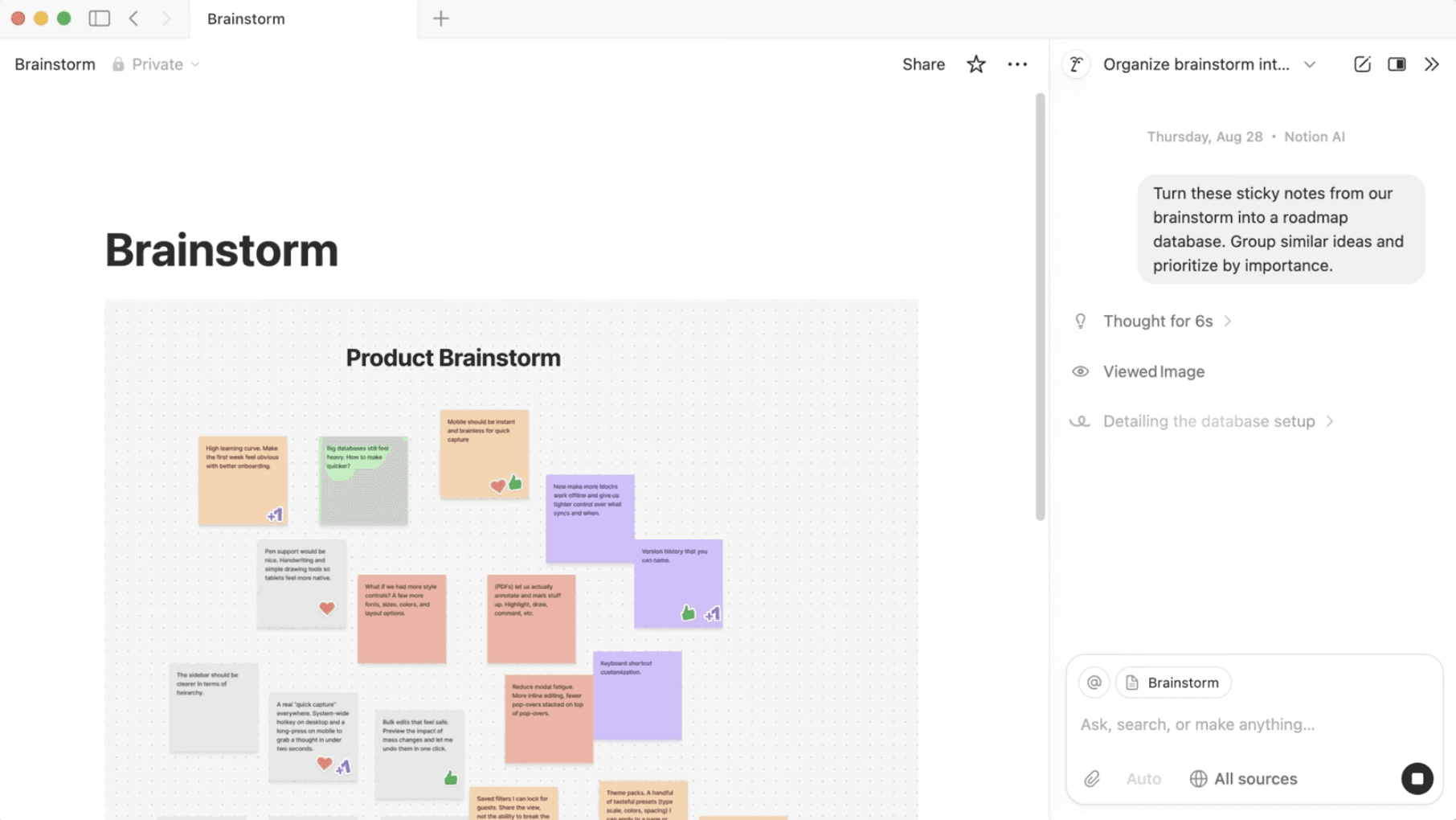
A screenshot of Notion AI turning product brainstorm sticky notes into a roadmap database (Source)
Notion AI is especially useful during the “blank page” moments that often slow teams down. That’s because you can use it for these tasks:
Turning rough ideas into structured specs
Drafting acceptance criteria from product notes
Summarizing meeting discussions into decisions and next steps
Creating task lists from long-form docs
Instead of replacing human input, AI helps you move faster by creating a solid starting point so you can focus on thinking, not formatting. Using an engineering team documentation template can also help you reduce manual work and the risk of human error.
4. Connect sprints, backlogs, and specs
This step is where your workflows really come to life. You’ll want to link everything you’ve created—like sprint tasks, specs, designs, and decisions—so your engineering team can see context instantly during planning.
During execution, progress updates will roll back into the spec and roadmap automatically. The result is fewer clarifying questions, fewer meetings, and a shared understanding of what “done” means that helps you stay aligned and work faster.
5. Maintain your workflow with AI updates and continuous improvement
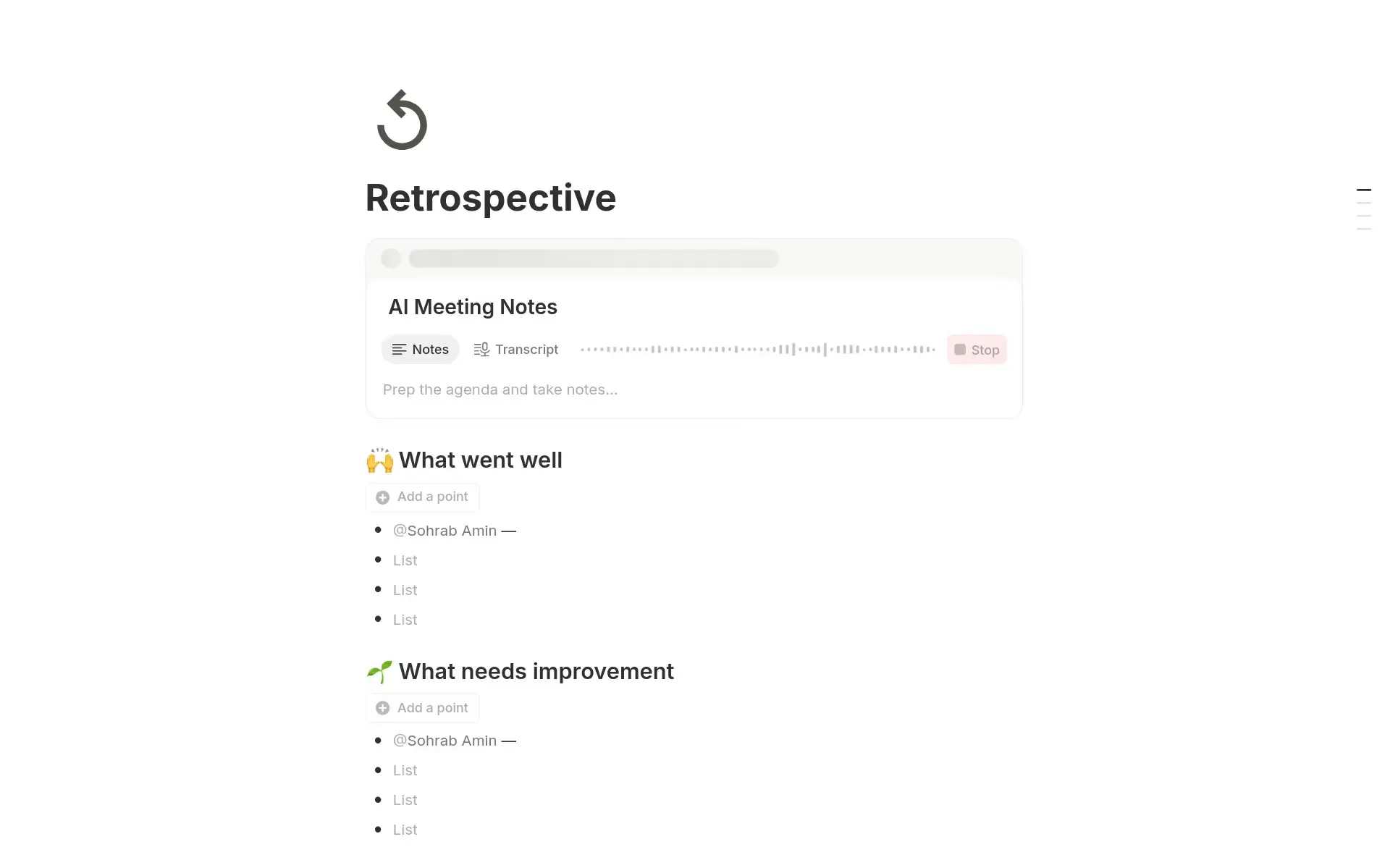
A retrospective template, available in Notion (Source)
Workflows only help if they stay current. That’s why you can use Notion AI for these tasks:
Generating weekly sprint summaries
Drafting release notes from completed work
Creating retro inputs based on what shipped and what didn’t
Summarizing long threads or decision histories for new teammates
When Notion AI handles these aspects, the workflow will stay useful without ongoing maintenance work and scale alongside your team rather than slowing it down.
What does an end-to-end engineering workflow look like in practice?
Here’s an example of what a connected, end-to-end engineering workflow might look like in Notion:
Idea: Shared ideas databases capture product insights, and Notion AI helps you expand those insights into clear problem statements.
Ticket: Teams track each idea via tickets and link them back to the original context so nothing goes missing.
Spec: AI-generated spec pages pull in requirements, constraints, and success metrics.
Sprint: Sprint views organize tasks so engineers can see specs, designs, and decisions in context.
Review: Review notes and testing results attach directly to the ticket or spec.
Release: Release notes summarize completed work for stakeholders.
Retro: The sprint retro references what shipped, what didn’t, and why.
Next cycle: Learnings feed directly into the backlog and roadmap.
If you get stuck creating your own workflow, try using one of these free engineering workflow templates or check out this guide on how to streamline project management in engineering.
Build your next engineering workflow with Notion AI
Great engineering workflows remove friction, not add it. They also make work visible, decisions durable, and learning continuous throughout each iteration and sprint lifecycle.

Template
If you get stuck creating your own workflow, try using one of these free engineering workflow templates or check out this guide on how to streamline project management in engineering.
Notion is uniquely positioned to support this process because it brings docs, tasks, roadmaps, and AI together in one flexible workspace. This eliminates forced processes and disconnected tools so your system adapts as your team grows.
If your team is ready to move faster without losing alignment, it might be time to rethink your end-to-end engineering workflow. Try Notion AI for free today to learn how we can help you keep your engineering workflows connected and up to date without adding extra overhead.
References:
*Numerious Productivity Study commissioned by Notion (n=1,000). Question: Which of the following tools or software does your organization use, if any? Select all that apply.